
HIPAA compliant CRM: what regenerative medicine clinics need
What a HIPAA compliant CRM must include for regenerative medicine clinics: a signed BAA, encryption, access controls, audit logs, and safe patient messaging.

A HIPAA compliant CRM is a customer relationship management system your clinic can safely use for protected health information because the vendor signs a business associate agreement (BAA) and the software provides encryption, role-based access, audit logs, and secure messaging. No CRM is officially HIPAA certified, so compliance comes from the contract, the safeguards, and how your team works. For regenerative medicine clinics, the real test is whether the CRM protects patient details across every step from first inquiry to follow-up.
This guide is for owners, COOs, and patient advocate leads at regenerative medicine clinics. It explains what to require, what to ask vendors, and where generic tools tend to fall short. It is educational, not legal advice, so confirm your obligations with a qualified health privacy advisor.
What is a HIPAA compliant CRM?
A HIPAA compliant CRM is a patient relationship system that can store and process protected health information (PHI) under a signed BAA with safeguards that meet the HIPAA Security Rule.
A CRM tracks every inquiry, conversation, quote, and follow-up with a patient. In a regenerative medicine clinic, that record quickly fills with health details: the condition a patient asks about, imaging they upload, medications they mention, and travel dates for a visit. Once a CRM holds that information on your behalf, the vendor is acting as a business associate.
HHS explains that a cloud service that creates, receives, maintains, or transmits electronic PHI for a covered entity is a business associate, even if the data is encrypted and the vendor cannot read it. See the HHS guidance on HIPAA and cloud computing. That is why the BAA is the starting point, not a nice extra.
It also helps to know what HIPAA compliant does not mean. The same HHS guidance states that the Office for Civil Rights does not endorse, certify, or recommend specific technology or products. A badge on a pricing page is marketing. The signed agreement and the safeguards behind it are what count.
Does HIPAA apply to your regenerative medicine clinic?
HIPAA applies to health care providers that transmit health information electronically in connection with certain standard transactions, so whether your clinic is covered depends on how you operate.
HHS defines covered entities as health plans, clearinghouses, and health care providers such as doctors and clinics, but only if they conduct those electronic transactions. Many regenerative medicine clinics run largely on self-pay, which makes the question worth checking rather than assuming.
Even when the answer is unclear, many clinics choose HIPAA-level safeguards for three practical reasons:
- Patients share sensitive health details in the very first message, often before they ever book.
- Clinics that bill any insurance, or work with physicians and partners who do, may be covered for at least part of their work.
- Patients who compare clinics, especially those planning travel, notice when a clinic treats their information carefully.
What features must a HIPAA compliant CRM include?
A HIPAA compliant CRM must pair a signed BAA with technical safeguards for access, audit, integrity, authentication, and transmission security.
The HHS summary of the HIPAA Security Rule lists the technical safeguards that apply to systems holding electronic PHI. Here is how they translate into CRM features:
| Requirement | What it means in a CRM | What to ask the vendor |
|---|---|---|
| Business associate agreement | A signed contract covering the CRM and its subcontractors | Will you sign a BAA, and which products and add-ons does it cover? |
| Access control | Unique logins and role-based permissions so staff see only what they need | Can we limit fields and records by role? |
| Audit controls | A log of who viewed, edited, or exported each record | Can we see and export access logs per patient? |
| Integrity | Protection against records being changed or deleted improperly | Are edits versioned, and can deletions be traced? |
| Authentication | Proof that each user is who they say they are | Do you support multi-factor sign-in for every user? |
| Transmission security | Encryption for data in transit | Are messages, forms, and file uploads encrypted in transit? |
| Encryption at rest | Stored data is unreadable without keys | Is all patient data encrypted at rest, including backups? |
| Data use limits | PHI used only to deliver the service | Is our data ever used to train AI models or shared with third parties? |
The Security Rule also expects backups, a contingency plan, and documented policies, so ask how the vendor handles data recovery and how you get your data back if you leave. HHS notes that a BAA should require the vendor to return or destroy PHI when the contract ends.
What should the business associate agreement cover?
A strong BAA defines how the vendor may use patient data, requires Security Rule safeguards, and obligates the vendor to report incidents and flow the same terms down to subcontractors.
HHS publishes sample business associate agreement provisions and a business associates FAQ. Use them as a checklist when you review a vendor contract:
- Permitted uses and disclosures of PHI are spelled out.
- The vendor will safeguard electronic PHI under the Security Rule.
- Security incidents and breaches are reported to your clinic.
- Subcontractors that touch PHI agree to the same terms.
- PHI is available for patient access, amendment, and accounting requests.
- PHI is returned or destroyed when the contract ends.
- Your clinic can terminate if the vendor violates a material term.
Pay special attention to scope. A BAA that covers the core database but not the texting add-on, the call recording tool, or the form builder leaves gaps right where patient conversations happen.
Which patient channels create the most HIPAA risk?
The riskiest channels are the ones your team uses informally, such as personal phones, consumer messaging apps, and website forms with third-party tracking.
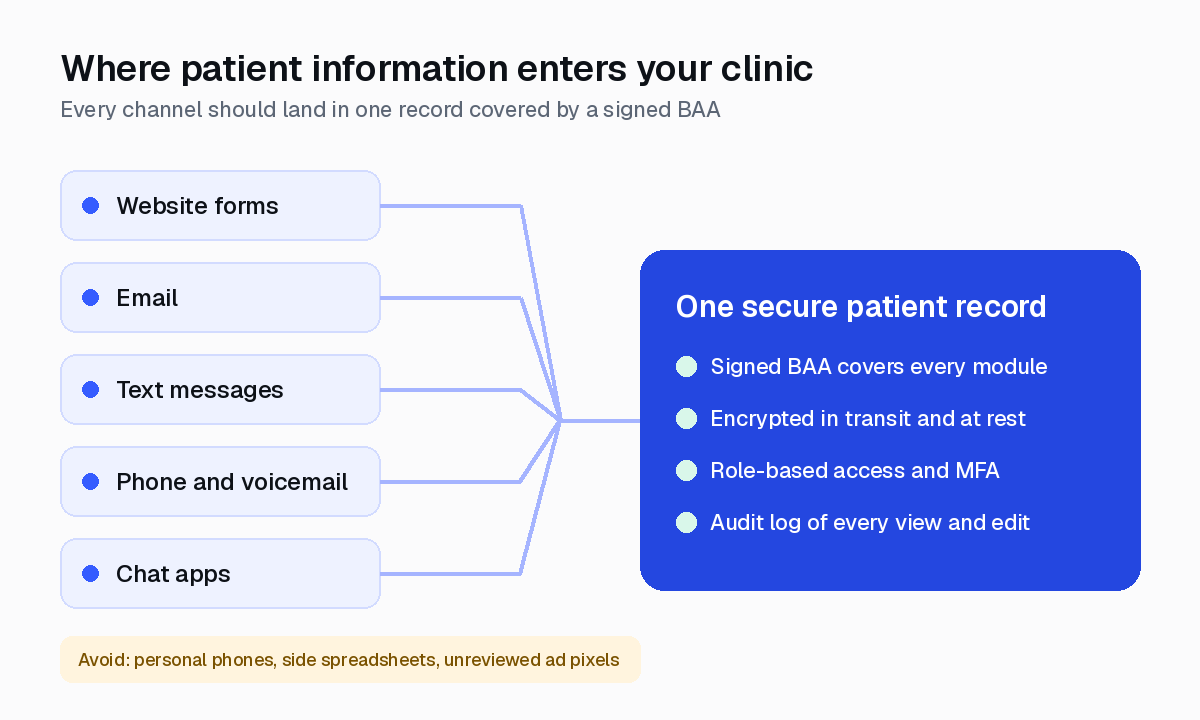
Regenerative medicine inquiries arrive everywhere: web forms, email, text, phone, social messages, and chat apps that international patients prefer. Each channel needs a covered path into your CRM.
| Channel | Common risk | Safer practice |
|---|---|---|
| Website forms | Tracking pixels capturing form fields | Confirm what each tag can see and use vendors that sign a BAA |
| Unencrypted messages with health details | Use a covered system and limit detail in unencrypted email | |
| Text messages | Staff texting from personal phones | Route texts through a covered business number logged in the CRM |
| Chat apps | Consumer accounts outside your records | Use business accounts covered by your agreements, or move the conversation |
| Phone and voicemail | Call notes scattered across notebooks | Log calls and recordings in the patient record with access controls |
HHS guidance says providers may email patients if they apply reasonable safeguards, and patients can choose to accept the risks of unencrypted email. See the HHS email FAQ.
Tracking deserves its own review. The HHS bulletin on online tracking technologies says a tracking vendor that receives PHI, for example from an appointment request, is a business associate, and that a cookie banner is not a valid HIPAA authorization. A federal court vacated part of that bulletin in 2024, but the vacated portion dealt with visits to public information pages, not booking forms or patient portals. If your marketing team runs ad pixels, read our guide to regenerative medicine marketing alongside this one.
How is a HIPAA compliant CRM different from a generic CRM?
A generic CRM is built for any sales team, while a healthcare CRM is built for the patient journey and the privacy rules that come with it.
General-purpose CRMs can be configured for health data, but the work usually falls on your clinic: finding the right plan, confirming which features the BAA covers, and stitching together texting, forms, and scheduling tools. Every extra connection is another place PHI can leak.
For regenerative medicine clinics, the patient journey has a specific shape. One record should follow the patient from inquiry through consult, travel preparation, treatment day logistics, follow-up, and referral. Speed also matters. Harvard Business Review research found that most companies respond to online leads far too slowly. A compliant CRM should help you answer fast without pushing staff onto personal phones to keep up.
How do you choose a HIPAA compliant CRM? A 6-step process
Choose a HIPAA compliant CRM by mapping where PHI flows, shortlisting vendors that will sign a BAA, and testing the safeguards before you migrate any patient data.
- Map your data flows. List every place patient information enters, moves, and is stored, including forms, inboxes, phones, chat apps, and spreadsheets.
- Confirm your HIPAA status. Work with a qualified advisor to confirm whether your clinic is a covered entity and what that means for your vendors.
- Shortlist on the BAA first. Remove any vendor that will not sign a BAA covering the products you will actually use.
- Test the safeguards. In a demo, check role permissions, audit logs, multi-factor sign-in, and data export.
- Check every connected tool. Confirm each integration, from texting to e-signature, is covered by its own agreement.
- Plan training and review. Write simple policies, train staff on the approved channels, and review access logs on a schedule.
Use this quick checklist when you compare finalists:
- Signed BAA that names every module you will use
- Encryption in transit and at rest
- Role-based access and multi-factor sign-in
- Exportable audit logs
- Text, email, and chat logged inside the patient record
- No use of your data to train AI models
- Clear data return or deletion when you leave
- Built around the patient journey, not a generic sales pipeline
What are the most common HIPAA CRM mistakes clinics make?
The most common mistake is assuming a vendor is compliant because it says so, without a signed BAA that covers every tool in use.
Watch for these patterns:
- Shadow channels. Coordinators texting patients from personal phones, outside any record or agreement.
- Spreadsheet side files. Patient lists exported to shared spreadsheets for follow-up.
- Everyone is an admin. Every user can see every record because roles were never set up.
- Pixels on booking pages. Marketing tags that capture appointment details on forms.
- Too much detail in reminders. Messages that reveal more than the patient needs. The minimum necessary standard is a good guide for routine messages.
Fixing these is often more about process than software, which is why the right CRM should make the compliant path the easiest path for your team. For more guides like this, browse our blog.
Where Caddie fits
Caddie is the AI operating system for regenerative medicine clinics. It is built only for regenerative medicine clinics and runs the full patient journey on one platform, from inquiry and conversion to preparation, treatment logistics, follow-up, and referrals.
If you need HIPAA-ready patient operations for regenerative medicine, here is what Caddie offers:
- HIPAA compliant, with a BAA. Caddie signs BAAs with clinics. Patient data is encrypted, access logged, and your data is never used to train AI models. Read how it works on our safety and HIPAA page.
- One patient record with full context. Every inquiry, message, and call sits in one patient record, with unlimited users.
- AI employees that work inside it. Mia, your AI Patient Coordinator, answers every inquiry right away, 24/7, and every conversation lands in the CRM for your team.
- Patient Portal (beta). A branded portal that gives patients one place for visit preparation, rolled out hands-on with each clinic.
Our team handles about 95% of setup, with about 1 hour a week from your team, and clinics go live in about 6 weeks.
Frequently asked questions
What makes a CRM HIPAA compliant?
A CRM is fit for patient data when the vendor signs a business associate agreement with your clinic and the product supports the safeguards the HIPAA Security Rule expects, such as encryption, unique logins, role-based access, audit controls, and secure transmission. Compliance also depends on how your team configures and uses it, so policies and training matter as much as features.
Is there an official HIPAA certification for CRM software?
No. The HHS Office for Civil Rights says it does not endorse, certify, or recommend specific technology or products. When a vendor says its CRM is HIPAA compliant, ask for the signed BAA and documentation of its safeguards rather than a badge.
Can a general-purpose CRM be HIPAA compliant?
Sometimes. Some general CRMs offer a BAA only on certain plans or only for certain features, and connected add-ons may not be covered. Read the BAA scope carefully, confirm which modules and integrations it covers, and keep patient health details out of any tool that is not covered.
Does a regenerative medicine clinic need a HIPAA compliant CRM if most patients pay cash?
HIPAA applies to health care providers that conduct certain standard transactions electronically, such as insurance billing, so coverage depends on how your clinic operates. Many clinics choose HIPAA-level safeguards anyway because patients share sensitive health details in inquiries. Confirm your status with a qualified health privacy advisor.
Do I need a BAA with my website analytics or ad pixel vendor?
If tracking tools on your site collect information that relates to a person's health or care, such as an appointment request or intake form, HHS guidance says the vendor may be a business associate and a BAA is needed. A cookie banner is not a HIPAA authorization. Review what your pixels can see on forms and booking pages.
See Caddie built around your clinic
Book a free call and we’ll show you how leading regenerative clinics convert more patients with Caddie.
Book a free demo